
SOAR (Security Orchestration, Automation, and Response)
By: Martin Johnson, Head of Product Marketing, BreachRx · Last updated: Oct 14, 2026
Security orchestration, automation, and response (SOAR) is technology that connects security tools and automates repeatable security operations workflows. Security operations center (SOC) teams use SOAR to enrich alerts, triage cases, execute approved containment actions, and record technical response steps. SOAR reduces manual work, but broader business incidents also require cross-functional decisions, regulatory assessment, trusted communications, and enterprise-wide coordination.
SOAR combines three capabilities. Orchestration connects security and IT tools through integrations so they can share data and act in sequence. Automation executes repeatable steps without an analyst, such as checking an IP address against threat intelligence or opening a ticket. Response gives analysts case management, collaboration, and reporting to work an incident through to technical closure.
Gartner coined the term in 2015, when it stood for security operations, analytics, and reporting, and redefined it in 2017. The updated definition describes SOAR as one platform that combines incident response, orchestration and automation, and threat intelligence management, capabilities that had previously been sold as separate products.
SOAR is primarily a technical response automation capability—not a substitute for enterprise incident response management. As an incident expands beyond the SOC, organizations need accountable owners, decisions, deadlines, communications, and an authoritative incident record alongside ongoing technical work.
How does SOAR work?
A SOAR platform works in five stages: ingest, enrich, triage, act, and track. Each stage turns an alert into a repeatable, documented technical response so analysts spend their time on decisions rather than copy-and-paste work.
- Ingest The platform receives alerts and events from a SIEM, endpoint detection and response (EDR), email security, cloud security tools, threat intelligence feeds, and user-reported phishing.
- Enrich It automatically adds context, such as indicator reputation, asset owner, user identity, vulnerability data, and related past cases.
- Triage and decide Playbook logic scores and routes the alert. Known false positives close automatically, and decisions that need judgment go to an analyst for review or approval.
- Act Integrations execute containment and remediation steps: block an IP address or domain, quarantine an email, isolate an endpoint, disable an account, or reset credentials.
- Track and report Case management records every action, artifact, and analyst note. Dashboards report metrics such as mean time to respond (MTTR), and the case either closes or escalates.
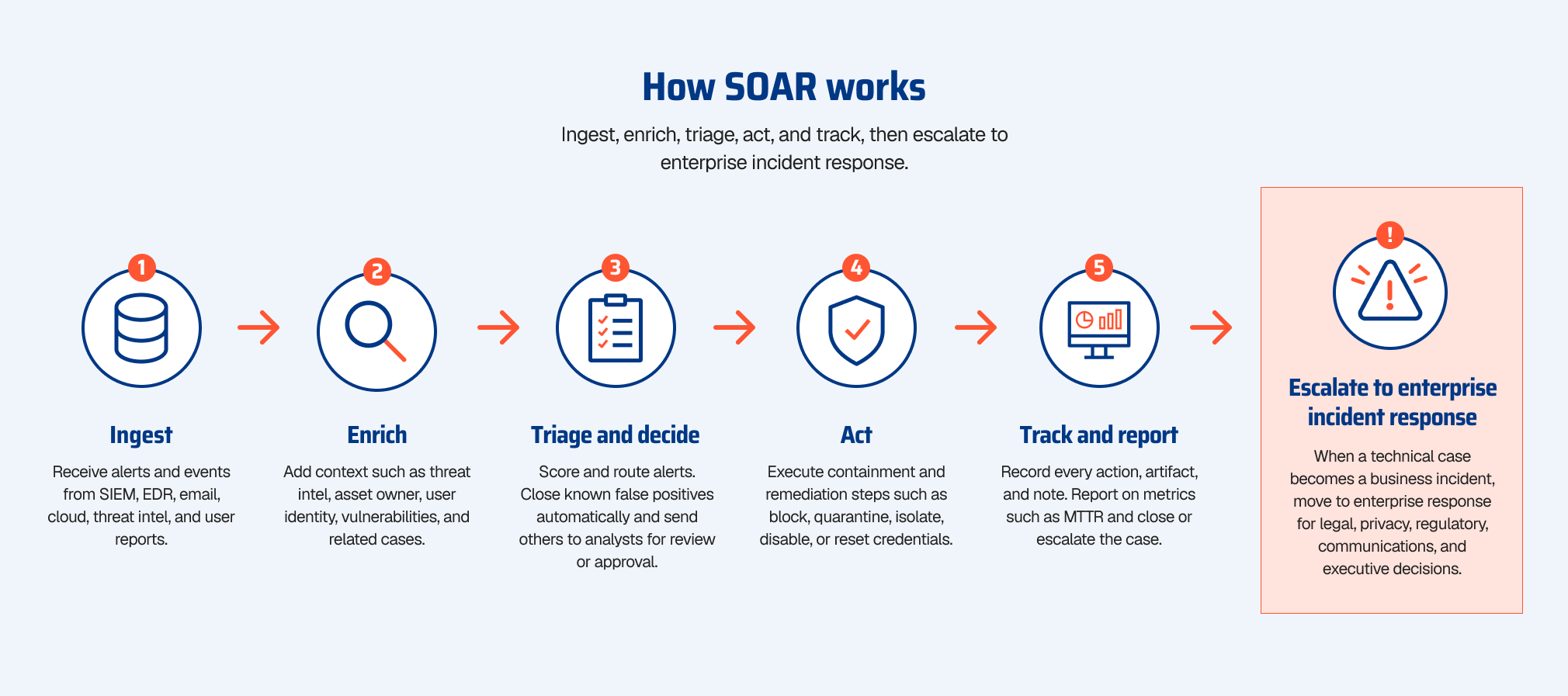
Escalation is not a hard stop for SOAR. Technical investigation and containment may continue while legal, privacy, communications, operations, and leadership coordinate the enterprise response. For example, isolating an endpoint does not by itself determine whether data was accessed, which notification requirements apply, or who must approve external communications.
Where does SOAR stop and enterprise incident response begin?
SOAR remains useful throughout an incident, but is generally not the system of record for cross-functional business decisions. When an investigation creates operational, privacy, legal, regulatory, or reputational exposure, the response must coordinate owners, approvals, obligations, communications, and evidence in parallel with technical actions.
A useful model is Detect → Contain → Govern → Close. SIEM supports detection and investigation; SOAR and XDR accelerate technical analysis and containment; Cybersecurity Incident Response Management (CIRM) coordinates the enterprise response, including governance and closure. These responsibilities overlap in practice rather than form a rigid linear handoff.
The workload after containment can be larger than the technical response. BreachRx’s 2026 Regulatory Concurrency research modeled more than 100 reporting obligations within one organization and more than 200 across a small set of affected entities. Those obligations shift as facts, jurisdictions, and thresholds change, which predefined playbooks are not built to track.
The most disruptive incidents also strain SOAR itself. SOAR depends on the integrations, identities, and access paths that connect its workflows. During identity compromise, ransomware, or a major outage, those dependencies may be unavailable or untrusted, so responders need a coordination environment that does not rely on them.
What are the core capabilities and use cases of SOAR?
Modern SOAR platforms center on six capabilities: integrations, playbook automation, alert enrichment, case management, threat intelligence management, and metrics.
| Capability | What it does | Example use case |
|---|---|---|
| Integrations and orchestration | Connects SIEM, EDR, email, identity, cloud, and ticketing tools through APIs | Passing a SIEM alert to EDR, identity, and ticketing tools in one workflow |
| Playbook automation | Runs predefined, repeatable response steps with optional human approval | Quarantining a confirmed phishing email from every mailbox |
| Alert triage and enrichment | Adds reputation, asset, and user context and closes known false positives | Auto-closing alerts on known-good IP addresses |
| Case management | Tracks artifacts, actions, analyst notes, and evidence for each security case | Keeping one record of a malware investigation from alert to closure |
| Threat intelligence management | Ingests and scores indicators and applies them across tools | Blocking newly published malicious domains at the firewall and proxy |
| Metrics and reporting | Measures SOC throughput and response times | Reporting mean time to respond (MTTR) by alert type |
Common SOAR use cases include phishing triage and response, malware and EDR alert containment, compromised credential response, indicator-of-compromise blocking, vulnerability prioritization, and cloud misconfiguration remediation.
What is a SOAR playbook?
A SOAR playbook is a predefined workflow that tells the platform which steps to run, in what order, and under which conditions when a specific type of alert arrives. Playbooks combine automated actions, decision logic, and points where an analyst must review or approve before the platform continues.
A typical phishing playbook looks like this:
| Step | Action | Run by |
|---|---|---|
| 1. Trigger | A user reports a suspicious email, or email security flags it | Automated |
| 2. Enrich | Extract sender, URLs, and attachment hashes; check reputation and detonate attachments in a sandbox | Automated |
| 3. Scope | Search all mailboxes for matching messages | Automated |
| 4. Verdict | Confirm the message is malicious when the score is ambiguous | Analyst |
| 5. Contain | Quarantine matching messages and block the sender, domain, and URLs | Automated, optional approval |
| 6. Remediate | If a user clicked or entered credentials, reset the password, revoke sessions, and isolate the endpoint | Automated with approval |
| 7. Close or escalate | Update the case, notify the reporter, and close or escalate | Automated |
A SOAR playbook is not the entire enterprise incident response plan. Some playbooks include escalation and collaboration, but a compromised mailbox containing customer data can trigger work beyond automation: determining exposure, assessing notification obligations, documenting legal decisions, communicating with stakeholders, and tracking executive approvals.
What is the difference between SOAR, SIEM, XDR, and CIRM?
SIEM primarily collects and correlates security telemetry; SOAR automates connected security workflows; XDR unifies detection and response across integrated controls; CIRM coordinates cross-functional enterprise incident response. They are complementary technologies, not interchangeable categories.
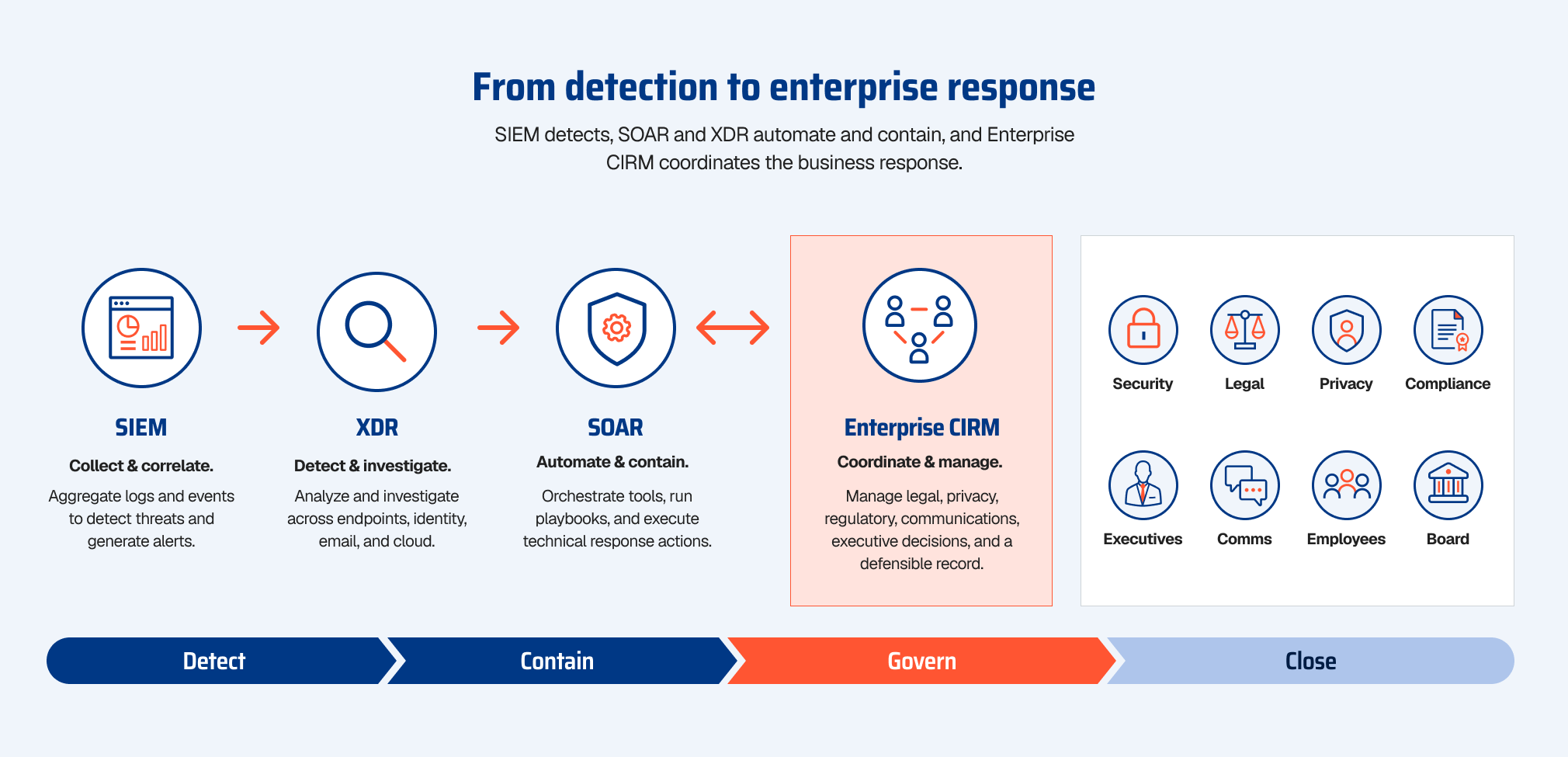
SOAR vs. SIEM vs. XDR vs. CIRM: Key Differences
SOAR, SIEM, XDR, and Cybersecurity Incident Response Management (CIRM) serve complementary roles in cybersecurity. While SIEM and XDR focus on threat detection and investigation, SOAR automates technical response workflows, and CIRM coordinates the cross-functional enterprise response, including governance, regulatory obligations, communications, and executive decisions.
| SOAR | SIEM | XDR | CIRM | |
|---|---|---|---|---|
| Primary purpose | Automate and coordinate technical security workflows | Collect, correlate, and detect across logs | Detect and respond across integrated endpoint, network, cloud, and identity controls | Govern cross-functional incident response |
| Typical users | SOC, security engineering | SOC analysts, threat hunters | SOC, IR teams | Security, IT, legal, privacy, communications, executives |
| Core output | Automated playbook actions and security cases | Alerts, searches, reports | Correlated detections and containment actions | Decisions, obligations, approvals, and a defensible incident record |
| Data scope | Data from connected security and IT tools | Logs and events from any source | Telemetry from the vendor’s integrated controls | Technical facts plus legal, regulatory, business, and executive context |
| Where it stops | Technical workflow or case closure | Alerting and investigation | Technical containment | Enterprise incident closure |
These technologies work together rather than replacing one another. Many vendors bundle SOAR into SIEM and XDR platforms, so product labels overlap. A useful test is whether a tool helps the SOC find and contain threats, or helps the whole organization make and document incident decisions.
For a deeper comparison, read SOAR vs. CIRM: 5 Gaps Your SOAR Platform Does Not Close.
What role does SOAR play in incident response?
SOAR accelerates repeatable technical steps in incident response, especially enrichment, triage, investigation, and containment. Its workflows can continue as the enterprise response team coordinates business, legal, regulatory, and operational decisions.
During an incident, SOAR helps responders:
- Triage and validate high volumes of alerts automatically
- Enrich indicators and scope affected users, systems, and mailboxes
- Run the same containment steps every time, with approval gates where needed
- Isolate endpoints, disable accounts, and block malicious infrastructure across tools
- Record technical actions and artifacts in a case history
- Measure response times for SOC reporting and improvement
In the NIST Cybersecurity Framework 2.0, SOAR maps most directly to the Respond function’s technical outcomes: triaging and prioritizing incidents (RS.MA-02, RS.MA-03), recording investigation actions (RS.AN-06), and containing and eradicating incidents (RS.MI-01, RS.MI-02). NIST SP 800-61 Revision 3 places those activities inside a broader model that also covers governance, stakeholder communication, and recovery.
SOAR executes the technical response; enterprise response governs the business response. The same Respond function asks organizations to notify internal and external stakeholders (RS.CO-02) and to execute the incident response plan with relevant third parties (RS.MA-01). Those outcomes depend on legal interpretation, business context, accountable owners, and a contemporaneous record of why the organization acted as it did.
What are the limitations of SOAR?
SOAR is highly effective for repeatable SOC work, but automation alone does not cover the entire enterprise response. Five common limitations are:
- Playbook engineering burden. Playbooks and integrations need ongoing development and testing. A vendor API change or a new tool can silently break an automation.
- Known patterns only. Predefined logic works well for familiar alert types. Novel, multi-stage, or ambiguous incidents fall outside the playbook and return to manual work.
- Integration dependency. SOAR can only act through the tools it connects. During identity compromise, ransomware, or a major outage, those connections may be unavailable or untrusted.
- Automation risk. An aggressive action, such as disabling an executive’s account or isolating a production server, can disrupt the business. Teams add approval gates, which slows the automation they bought SOAR for.
- Cross-functional governance. Although some SOAR platforms support broader workflows, they are not principally built to manage changing regulatory obligations, legal privilege, executive approvals, crisis communications, and a defensible enterprise decision record.
This is a different scaling problem: SOAR scales technical actions; enterprise response must scale decisions and coordination. Containment can take minutes, while the business response may continue for weeks or months. Without a dedicated enterprise layer, that work fragments across email, chat, meetings, documents, and spreadsheets.
How is SOAR changing?
SOAR capabilities are increasingly incorporated into SIEM, XDR, and AI-driven security operations platforms. The buying decision is shifting from whether to deploy a separate SOAR product to how organizations automate detection and technical response across their security stack.
AI-assisted investigations and workflow generation are expanding what security automation can do. Human oversight, integration reliability, and controls on potentially disruptive actions remain important regardless of whether a workflow is deterministic or AI-assisted.
As technical response gets faster, cross-functional decision throughput becomes the constraint. Automated containment can hand a confirmed business incident to legal, privacy, communications, and executives within minutes. Their work, including regulatory assessment, notification decisions, and approvals, still requires governed execution. That is why AI incident response has to extend beyond SOC automation.
How does BreachRx work with SOAR?
BreachRx complements SOAR rather than replacing it. The Rex Platform™ provides Cybersecurity Incident Response Management (CIRM): the coordinated enterprise response layer across security, IT, legal, privacy, communications, and leadership, before, during, and after an incident.
Connect security operations to enterprise response. Rex can launch incidents from SOAR platforms, Slack, intranet forms, and other integrated sources. Listed integrations include Cortex XSOAR, CrowdStrike, Google SecOps, Jira, and ServiceNow; a documented GraphQL API and Zapier support additional integration patterns.
Coordinate cross-functional execution. Rex brings incident commanders, security, IT, legal, privacy, communications, and executives into role-based workflows with accountable owners, tasks, approvals, status, and one authoritative incident record. SOAR continues its technical work.
Surface regulatory obligations as facts evolve. Cyber RegScout® helps map incident details to potentially applicable requirements across more than 200 cybersecurity and privacy regulations, supporting assessments of deadlines, owners, and reporting actions.
Preserve trusted response communications. Rex offers out-of-band Mail, Chat, Meetings, and other response capabilities when primary email, collaboration tools, or identity services may be unavailable or untrusted. Its native authentication can complement or back up supported identity-provider configurations.
Build a defensible incident record. Rex captures actions, evidence, ownership, approvals, decisions, timestamps, and rationale so teams can establish what happened, what they decided, and why.
Apply agentic AI with human accountability. Rex AI® uses Maestro to coordinate specialist agents and support tasks, deadlines, regulatory analysis, and reporting from shared incident context, while consequential decisions remain subject to human judgment and approval.
SOAR accelerates technical security response. CIRM coordinates the enterprise response around it. Request a demo to see how the Rex Platform connects technical workflows to defensible, cross-functional action.
Frequently Asked Questions
1. What does SOAR stand for?
SOAR stands for security orchestration, automation, and response. It describes technology that connects security tools, automates repeatable tasks, and manages technical response workflows in the SOC.
2. What is an example of a SOAR tool?
Widely used SOAR platforms include Palo Alto Networks Cortex XSOAR, Splunk SOAR, Swimlane, Tines, Torq, and Sumo Logic Cloud SOAR. Many SIEM and XDR platforms, such as Google Security Operations, also include built-in SOAR capabilities.
3. What is the difference between SOAR and SIEM?
SIEM collects and correlates log data to detect and investigate threats. SOAR takes the alerts a SIEM produces and automates the response, such as enriching indicators, isolating endpoints, or opening tickets.
4. What is the difference between SOAR and XDR?
XDR detects and responds to threats across a vendor’s integrated security controls. SOAR orchestrates actions across many vendors’ tools through integrations and playbooks, so it is less tied to a single product family.
5. What is a SOAR playbook?
A SOAR playbook is a predefined workflow that runs automated steps, decision logic, and analyst approvals for a specific alert type, such as phishing or malware. Playbooks make technical response faster and more consistent.
6. Who uses SOAR?
SOC analysts, incident responders, security engineers, and detection engineers are the primary SOAR users. Managed security service providers also use SOAR to handle alerts across many customers.
7. What are the benefits of SOAR?
SOAR reduces manual work, shortens response times, and applies the same steps every time an alert type appears. It also creates a technical case history that supports SOC metrics and post-incident review.
8. Is SOAR dead?
No, but standalone SOAR is consolidating. Gartner labeled SOAR “obsolete before plateau” in 2024 because its capabilities were being absorbed into SIEM, XDR, and broader security operations platforms, not because security automation was going away.
9. Can SOAR fully automate incident response?
SOAR can automate many technical steps, but not the whole response. When an incident extends beyond the security team, the response also requires legal, privacy, regulatory, communications, and executive decisions that need human judgment and accountable owners.
10. What happens after SOAR contains an incident?
SOAR may close the technical case or continue working while the incident escalates. CIRM helps coordinate the associated business response—impact assessment, legal and privacy review, regulatory obligations, communications, approvals, and an authoritative incident record—through resolution and follow-up.